
Lumide allows selecting full keymap presets, recording shortcuts interactively, and customizing keybindings via
keymap.json.
Keymap Presets#
Lumide defaults to the JetBrains keymap profile. You can switch presets under Settings -> Keymap:
-
JetBrains (Default):
Shift + Shift(Search Everywhere),Cmd + Shift + O/Ctrl + Shift + N(Quick Open),Cmd + Option + L/Ctrl + Alt + L(Reformat Document). -
VS Code:
Cmd + P/Ctrl + P(Quick Open),Cmd + Shift + P/Ctrl + Shift + P(Command Palette),Cmd + D/Ctrl + D(Select Next Match). -
Sublime Text:
Cmd + P/Ctrl + P(Go to Anything),Cmd + Shift + D/Ctrl + Shift + D(Duplicate Line).
Keyboard Shortcuts Editor#
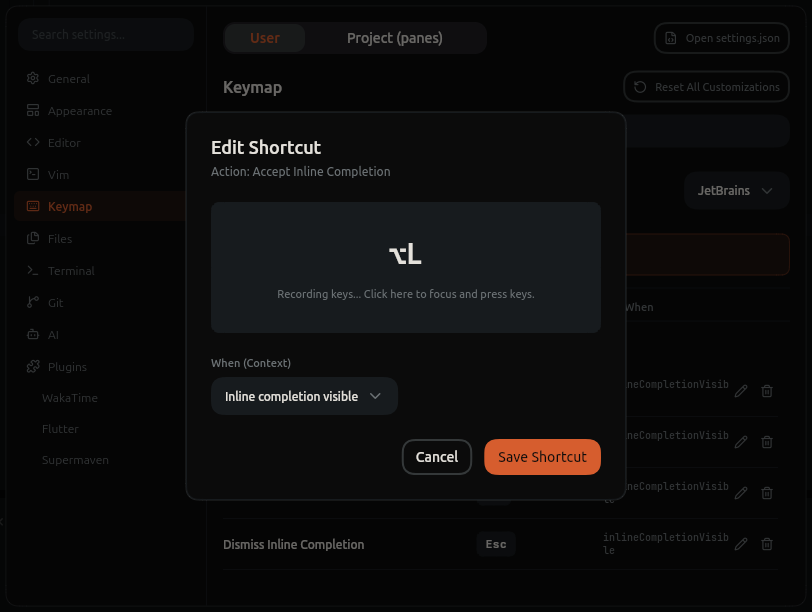
Open the graphical shortcuts manager:
-
Navigate to Settings -> Keymap (or open Settings with
Cmd + ,/Ctrl + ,and select Keymap). - Or run Preferences: Open Keyboard Shortcuts from the Command Palette.
Recording Shortcuts#
- Search for the action in the table.
- Double-click the entry (or click the edit pencil icon).
- Press your desired key combination directly on your keyboard in the recorder popup.
-
Press
Enterto confirm orEscapeto cancel.
Customizing via keymap.json#
Custom shortcuts and overrides are stored in ~/.sofluffy/lumide/keymap.json:
{
  "base": "jetbrains",
  "bindings": [
    {
      "key": "cmd+shift+r",
      "action": "reloadWindow"
    },
    {
      "key": "ctrl+j",
      "action": "toggleBottomDock",
      "when": "!terminalFocus"
    }
  ],
  "unbind": [
    {
      "key": "cmd+d",
      "action": "selectNextOccurrence"
    }
  ]
}
Schema Properties#
| Field | Type | Description |
|---|---|---|
base |
string |
Base preset: "jetbrains", "vscode", or "sublime". |
bindings |
array |
Custom key combinations mapping to editor actions. |
unbind |
array |
Base bindings to disable or suppress. |
Binding Properties#
| Field | Type | Description |
|---|---|---|
key |
string |
Chord combination (e.g.
"cmd+shift+k"
,
"ctrl+alt+l"
). Use
mod
for the primary modifier: Cmd on macOS, Ctrl on Windows and Linux (e.g.
"mod+shift+k"
).
|
action |
string |
Identifier of the action to execute. |
when | string | Optional focus context condition. |
Context "When" Clauses#
editorTextFocus: Editor text buffer has focus.terminalFocus: Integrated terminal has focus.treeFocus: File Explorer tree has focus.inQuickOpen: Quick Open modal is visible.
Next Steps#
- Settings Reference — IDE configuration categories.
- SDK Manager — Manage Flutter and Dart SDK versions.
- Themes & UI — Personalize IDE themes and syntax styling.