
Lumide stores configuration in JSON and provides an interactive graphical settings editor.
Opening Settings#
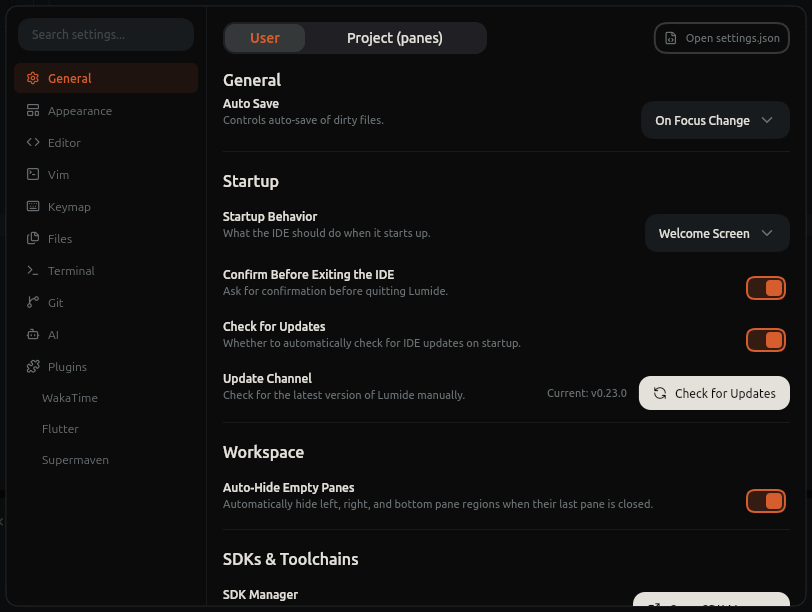
- Shortcut:
Cmd + ,(macOS) /Ctrl + ,(Windows/Linux). - Command Palette:
Preferences: Open Settings. - TopBar: Application menu or Session menu -> Settings....
Settings Scopes#
-
User Settings: Global configuration applied across all workspaces.
- Stored at:
~/.sofluffy/lumide/settings.json
- Stored at:
-
Workspace Settings: Project-specific overrides committed with your repository.
- Stored at:
<project>/.sofluffy/lumide/settings.json, or in thesettingssection of a workspace file when the window opened one - Takes precedence over User Settings when that project is open.
- Stored at:
-
Folder Settings: In a workspace of several folders, each added folder's own settings, for the files inside it.
- Stored at:
<folder>/.sofluffy/lumide/settings.json - Take precedence over Workspace Settings for the folder's files, and apply only to settings that can differ between folders (see below).
- Stored at:
For a setting that can differ between folders, a file gets the value from the deepest workspace folder that holds it:
folder > workspace > user > default. With a workspace file, the workspace settings are the file's
settings section, and every folder's own file, the first folder's too, is a folder file: it sets only what can differ between folders, for its files. Window settings, such as the theme, come from the workspace file and the user settings. Language overrides (languages.<id>) and platform overrides (macos,
linux, windows) work in a folder's file too; as elsewhere, a language override beats a plain value at any level.
Folder settings, like workspace settings, apply only in a trusted workspace. Remote SSH windows and browser windows use the workspace settings only.
In a guest window of a shared workspace, the host decides
editor.tab_size, editor.insert_spaces and editor.format_on_save
for its files, as its own editor resolves them per folder and language, over every layer of your settings. Every other setting is yours. These rows show a
From badge with the host's name.
Which Settings Apply per Folder#
| Applies per folder (resource) | Applies to the whole window |
|---|---|
editor.tab_size, editor.insert_spaces, editor.format_on_save |
editor.font_size, editor.font_family, editor.line_height |
editor.soft_wrap
,
editor.show_line_numbers
,
editor.show_indent_guides
|
editor.vim_mode.*, edit_predictions.* (AI completion) |
editor.show_code_lenses, editor.snippet_suggestions |
theme.*, general.*, status_bar.*, keymap.* |
editor.diagnosis.show_inline, editor.diagnosis.show_hover |
files.* (auto save, hot exit, Local History) |
editor.json_preview.show_annotations |
file_tree.*, logging.*, collaboration.*, agent.* |
git.inline_blame.enabled, git.inline_blame.delay_ms |
other git.* keys, dart.* |
terminal.default_profile (the folder a new terminal starts in) |
other terminal.* keys, including the profiles themselves |
plugins.config.<plugin>.<key> (plugin configuration) |
plugins.enabled, plugins.localPaths |
A folder's file that sets a window setting, or a key Lumide doesn't know, leaves it out; the Settings editor's Folder tab lists what it left out.
The Folder Tab#
With added folders, the Settings editor shows User, Project and Folder
tabs. With a workspace file, the Project tab is named Workspace after the file and edits its
settings section, keeping the rest of the file, and Folder lists the first folder too.
Folder edits an added folder's settings file; when the workspace has several added folders, a picker beside the tabs chooses which. The tab lists only the settings a folder can set, shows the value the folder's files get when the folder leaves one unset, and warns when the folder's file sets window settings or can't be read. In the User and Project tabs, a setting that a folder overrides shows a
Folder: name badge; click it to open that folder. Open settings.json
opens the selected folder's file.
Plugins read a folder's values by passing a file or folder as the scope of getConfiguration; without a scope they get the workspace value.
Core Settings Reference#
Editor (editor.*)#
| Key | Type | Default | Description |
|---|---|---|---|
editor.font_size |
double |
13.0 |
Editor font size in pixels. |
editor.font_family |
string |
"JetBrains Mono" |
Monospace font family. |
editor.line_height |
double |
22.0 |
Line height in pixels. |
editor.show_line_numbers |
bool |
true |
Display line numbers in gutter. |
editor.soft_wrap |
bool |
false |
Wrap long lines to viewport. |
editor.format_on_save |
bool |
false |
Automatically reformat code on save. |
editor.tab_size |
int |
2 |
Number of spaces per tab indentation. |
editor.insert_spaces |
bool |
true |
Insert spaces instead of \t. |
editor.show_indent_guides |
bool |
true |
Display vertical indentation guide lines. |
editor.diagnosis.show_inline |
bool |
false |
Display diagnostic squiggly lines inline. |
editor.diagnosis.show_hover |
bool |
true |
Display diagnostics in hover popup. |
Files & Recovery (files.*)#
| Key | Type | Default | Description |
|---|---|---|---|
files.auto_save |
string |
"onFocusChange" |
Auto-save mode:
off
,
afterDelay
,
onFocusChange
,
onWindowChange
.
|
files.auto_save_delay |
int |
1000 |
Delay in milliseconds when auto_save is afterDelay. |
files.hot_exit |
bool |
true |
Backup unsaved buffers across quits and reboots. |
files.local_history |
bool |
true |
Maintain file revision history before saves. |
files.local_history_max_versions |
int |
50 |
Maximum snapshot revisions kept per file. |
files.local_history_max_file_size_kb |
int |
5120 |
Maximum file size in KB for history snapshots. |
Theme & Appearance (theme.* & general.*)#
| Key | Type | Default | Description |
|---|---|---|---|
theme.mode |
string |
"system" |
Theme mode: dark, light, or system. |
theme.dynamic_theme |
bool |
false |
Synchronize theme with OS light/dark schedule. |
theme.dark |
string |
"ailurus-dark" |
Preferred dark color theme ID. |
theme.light |
string |
"ailurus-light" |
Preferred light color theme ID. |
theme.icon_theme |
string |
"" |
File icon pack. |
general.background_image |
string |
"" |
File path to custom workspace wallpaper. |
general.background_opacity |
double |
1.0 |
Wallpaper opacity (0.0 to 1.0). |
general.background_fit |
string |
"cover" |
Wallpaper fit (cover, contain, fill). |
File Tree (file_tree.*)#
| Key | Type | Default | Description |
|---|---|---|---|
file_tree.open_mode |
string |
"singleClick" |
singleClick or doubleClick to open files. |
file_tree.auto_reveal_active_file |
bool |
false |
Highlight active tab in file tree. |
file_tree.file_nesting.enabled |
bool |
false |
Group generated files under parent files. |
file_tree.show_hidden_files |
bool |
true |
Display dotfiles. |
file_tree.show_diagnostics |
bool |
true |
Highlights problematic files in tree. |
Git (git.*)#
| Key | Type | Default | Description |
|---|---|---|---|
git.inline_blame.enabled |
bool |
true |
Display author blame ghost text on active line. |
git.inline_blame.delay_ms |
int |
0 |
Milliseconds before blame text displays. |
git.separate_staged_unstaged_lists |
bool |
true |
Separate staged and unstaged files in C.O.R.G.I. |
git.stage_resolved_conflicts |
bool |
true |
Stage a conflicted file once no conflict markers are left in it. |
git.sync_branch_operations |
bool |
false |
With several repositories, check out and create branches in all of them at once. |
git.show_ignored_files |
bool |
true |
Display ignored files in git views. |
Terminal (terminal.*)#
| Key | Type | Default | Description |
|---|---|---|---|
terminal.shell_path |
string |
"" |
Custom shell executable path (empty = default OS shell). |
terminal.font_size |
double |
13.0 |
Terminal font size. |
terminal.font_family |
string |
"JetBrains Mono" |
Monospace font family. |
Direct JSON Editing#
Open ~/.sofluffy/lumide/settings.json directly via Command Palette: Preferences: Open User Settings (JSON).
Next Steps#
- Themes & Appearance — Themes, icons, and wallpaper.
- Keyboard Shortcuts & Keymaps — Key bindings and presets.