
Lumide includes an SDK Manager to detect, download, and switch Dart and Flutter SDK toolchains.
Opening the SDK Manager#
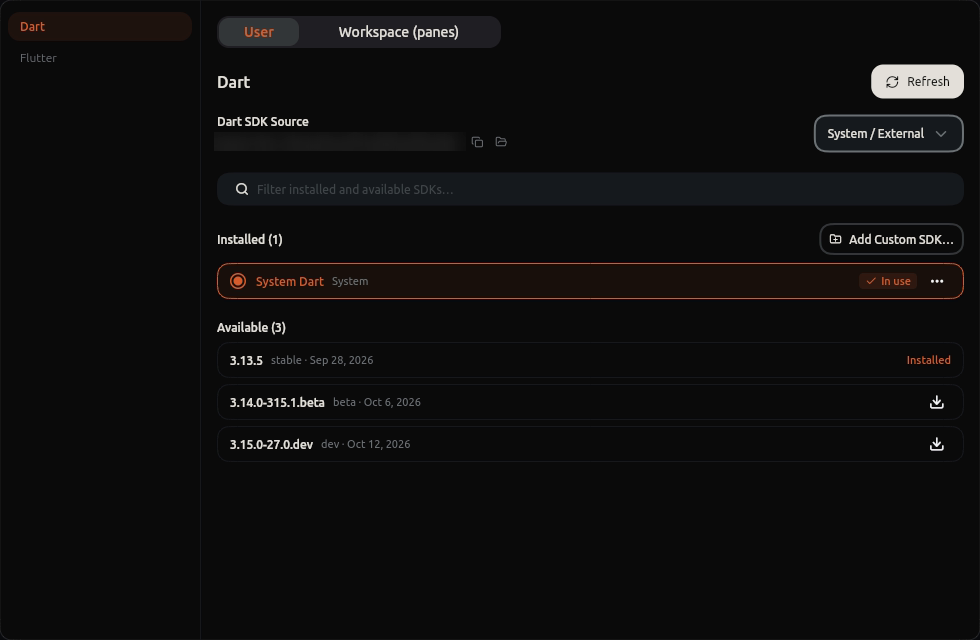
- Click the SDK Badge in the bottom status bar (e.g.,
Dart 3.5.0). -
Or run SDK Manager: Open from the Command Palette (
Cmd + Shift + P/Ctrl + Shift + PorCmd + Shift + A). - Or open Settings -> Dart SDK.
Features#
1. Local SDK Detection#
Scans system PATH, standard development paths, and version managers (such as FVM). Detected installations display their version, channel (Stable, Beta, Dev), and path.
2. Built-in SDK Downloader#
Browse available official Dart and Flutter releases. Click Download on any release to download and extract it to
~/.sofluffy/lumide/sdks/ with background progress tracking.
3. One-Click Switching#
Click Set as Active on any version to switch runtime toolchains immediately:
- Reconnects the Dart Analysis Server to the selected SDK.
- Updates terminal environment paths.
- Does not require restarting the IDE.
Next Steps#
- Plugins & Marketplace — Extend IDE features.
- Documentation Overview — Return to guide index.