
Lumide provides context-aware completions powered by active Language Servers.
Triggering Suggestions#
-
Automatic: Appears as you type characters or member access operators (
.or::). - Manual: Press
Ctrl + Spaceanywhere in the code.
Completion Popup#
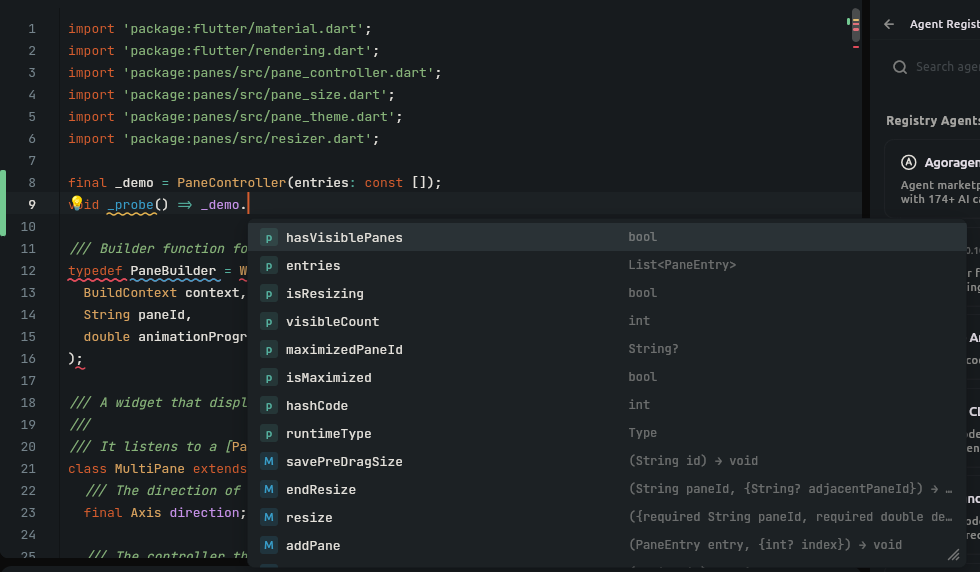
- Icons by Symbol Kind: Distinct glyphs for Methods, Properties, Classes, Interfaces, Keywords, and Snippets.
- Documentation & Details: Displays function signatures, return types, and markdown doc-comments alongside suggestions.
-
Auto-Imports: Selecting an unimported class or top-level function automatically adds the required
importstatement at the top of the file without disrupting existing import formatting.
Keys & Navigation#
| Key | Action |
|---|---|
Down | Next suggestion |
Up | Previous suggestion |
Tab or Enter |
Accept highlighted suggestion |
Escape | Close completion popup |
Next Steps#
- Hover & Definitions — Type tooltips and declaration jumps.
- Diagnostics & Problems — Problem panel and squiggles.