
Lumide includes an in-editor search and replace widget with regex support.
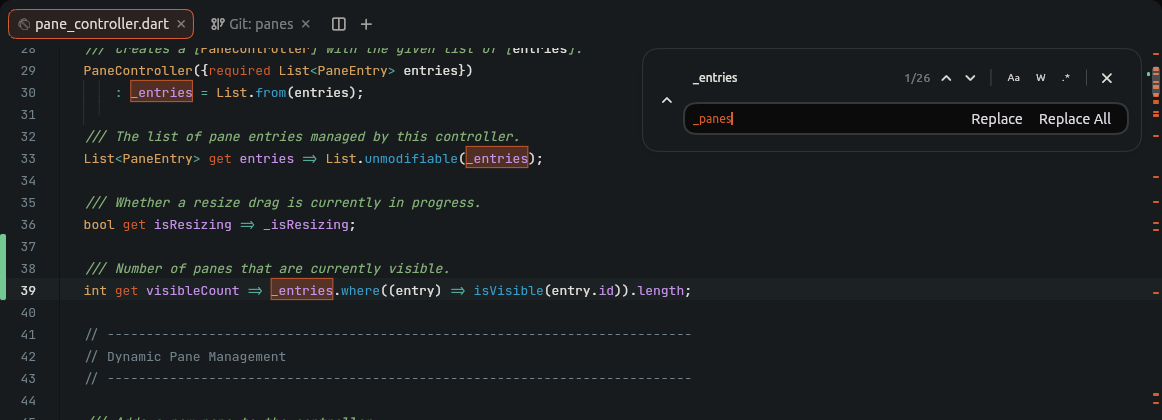
Navigation & Controls#
| Action | Control |
|---|---|
| Find | Cmd + F (macOS) / Ctrl + F (Windows / Linux) |
| Next Match | Enter or Next Match button (⌄) |
| Previous Match | Shift + Enter or Previous Match button (⌃) |
| Toggle Replace Row | Expand button (⌄ / ⌃) next to the input |
| Replace Current | Replace button |
| Replace All | Replace All button |
| Close Search | Escape or Close button (✕) |
If text is selected before opening Find, the selection is automatically pre-filled into the search box.
Search Options#
Toggle search flags via the toolbar buttons inside the search box:
| Option | Icon | Behavior |
|---|---|---|
| Match Case | Aa | Case-sensitive search. |
| Whole Word | W |
Matches word boundaries only (e.g., test will not match testing). |
| Regular Expression | .* |
Enables regex pattern matching. |
Regex Capture Groups#
When Regex (.*) is enabled, use $1, $2, etc., in the Replace box:
- Find:
([a-z]+)Id - Replace:
target_$1 - Result:
userIdbecomestarget_user.
Visual Indicators#
-
Counter: Displays
current of totalmatches (e.g.3 of 12). - Editor Canvas: All matches are highlighted in the document.
- Scrollbar Track: Match positions display as yellow tick marks along the scrollbar track.
Next Steps#
- Formatting & Indentation — Tabs, spacing, and formatting.
- Snippets — Template expansion.