Edit, analyze and run Dart and Flutter in your browser at dartpad.lumide.dev. It's Lumide, with packages from pub.dev, and no server: everything runs in the tab, on the DartPad SDK from the Dart team.
Your project#
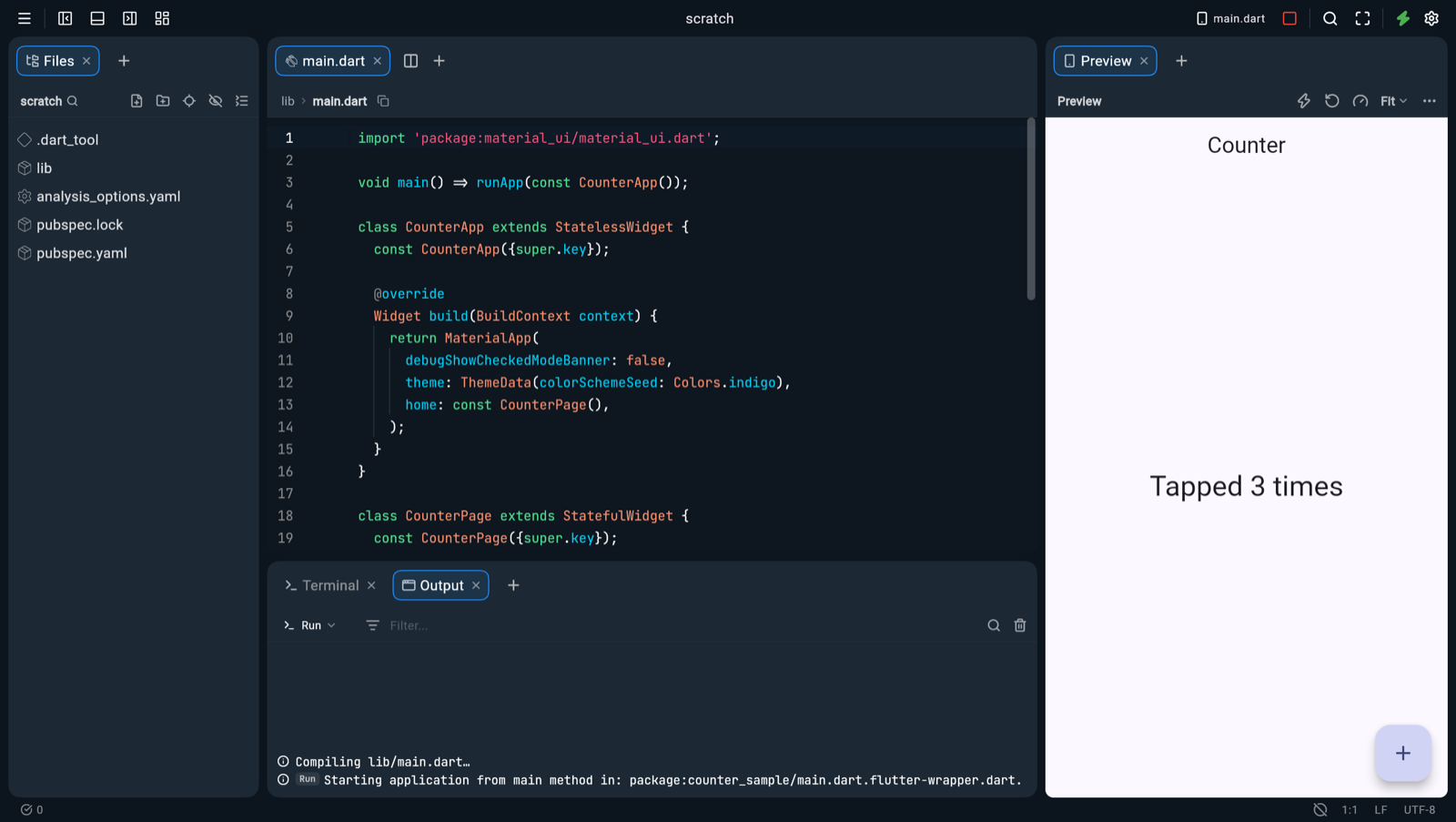
The page opens your scratch project, a Flutter counter app. It stays in your browser, so your edits are there next time.
The project's menu#
Click the project's name in the title bar for its menu: Copy Link to This Project, Download Project as Zip,
Rename Project…, Delete Project…, Go to Start Page, and ways to start or open another. The same actions are in the Command Palette, under
DartPad:.
Copy Link copies the link that opens a sample, GitHub repository, package or Gist from where it came from, so anyone gets the original, not your edits. Your scratch project and new apps live only in this browser: download them as a zip to send them.
The start page#
Close the project, and DartPad's start page shows:
- Start something: New Flutter App, New Dart App, and the samples.
-
Open from…: GitHub Repository…, pub.dev Package… and Gist…. Type a name, such as
dart-lang/samplesorpath, or paste a link, such ashttps://github.com/dart-lang/samples/tree/main/command_line. It opens exactly as the links below do. - Your projects: everything saved in this browser, with its kind, where it came from and when you last opened it. Hover one to rename it, download it as a zip, or delete it.
A link opens something else, each in a folder of its own, so it never overwrites your scratch project:
| Link | Opens |
|---|---|
?sample=counter |
One of the samples:
dart
,
flutter
,
fibonacci
,
counter
|
?gist=<id> |
A GitHub gist. Top-level Dart files go into
lib/
, and a gist without a
pubspec.yaml
gets one from its imports
|
?package=<name> |
A package from pub.dev, at its latest version; add
&version=1.2.3
for another. Dependencies the browser can't use are left out, and a notice names them: Flutter plugins, build tools such as
build_runner
, packages with build hooks, and Git or outside paths
|
?github=<owner>/<repo> |
A public GitHub repository; add
@<branch, tag or commit>
after it, and
&path=<folder>
to open one folder. It's your copy: change anything, it's saved in this browser, and nothing goes back to GitHub. The same dependencies are left out as for a package. Up to 2,000 files and 50 MB; images, fonts and other binaries, and files over 2 MB, stay on GitHub. GitHub allows a browser 60 requests an hour, and opening a repository takes one
|
Opening the same link again shows the project with your edits, not a fresh copy. For a GitHub repository, Fetch Again in the notice replaces your copy with GitHub's, after asking.
Your own code runs as it opens: the counter on your first visit, the samples, a new app, and a project you saved. Code from a gist, a package or a GitHub link never runs on its own: the notice and the Preview say where it came from, such as "Code from github.com/dart-lang/samples", and it runs when you press Run.
Analysis#
The Dart analysis server runs in the browser. Problems, completion, hover, go to definition and quick fixes work as on the desktop. Go to definition opens SDK and package sources too, read-only.
Run#
Press Run in the title bar. A Dart program prints to the Run output. A Flutter app shows in the Preview pane, on the right.
| Command | Keys |
|---|---|
| Flutter: Run | |
| Flutter: Hot Reload | Cmd+\ (Ctrl+\) |
| Flutter: Hot Restart | Cmd+Shift+\ (Ctrl+Shift+\) |
| Flutter: Stop App | |
| Flutter: Open Preview | |
| Flutter: Open DevTools | |
| Flutter: Pub Get, Pub Upgrade, Pub Outdated |
Flutter: Open DevTools opens Dart DevTools on the running app, beside the code: the widget inspector, performance, memory and logging.
The Preview's sizes and views#
The Preview's header has the same tools as a Raccoon app's pane: ⚡ Hot Reload, Hot Restart, DevTools, the size, and ⋯.
- Size: Fit fills the pane. Phone (390×844), Tablet (820×1180), Desktop (1280×800) or Custom… gives the app that size, scaled down to fit the pane. Landscape turns it on its side. The app runs at the page's pixel ratio: a browser frame can't take a device's.
- ⋯ → Add View At: the app at one more size, as another pane beside the Preview, or as a frame of its own when the center is an O.W.L. board. Add as many as you like.
Each view runs the app in a sandbox of its own, on the same worker. Views share no state: tapping a button in one doesn't change another. Saving hot reloads every view, Hot Restart restarts them all, and Stop stops them all. Close View in a view's ⋯ closes it. The Run output and DevTools follow the Preview.
Each view costs memory. With the counter, one more view added about 180 MB of JavaScript heap in its frame and 160 to 200 MB in the worker.
Saving a Dart file hot reloads the running app. Saving a pubspec.yaml gets its packages. Turn either off in
Settings → Flutter: Hot Reload on Save (flutter.hotReloadOnSave) and Pub Get on pubspec.yaml Save (flutter.pubGetOnPubspecSave).
A project whose pubspec.yaml depends on Flutter loads the Flutter SDK, about 35 MB. A Dart project loads only the Dart SDK, about 7 MB. Add Flutter to a Dart project's
pubspec.yaml and save: DartPad loads the Flutter SDK and moves the project there.
Terminal#
The terminal runs dart and flutter on the worker:
dart pub add http          # get | add | upgrade | outdated | remove | downgrade
flutter pub get
dart run bin/tool.dart     # prints here and in Run
flutter run                # runs the app in the Preview pane
dart --version
cd, ls, pwd and clear move around the project. Any other command says it's not available in the browser.
Full screen#
A browser keeps some shortcuts for itself: Cmd+W closes its tab, Cmd+T and
Cmd+N open new ones, Cmd+1 switches tabs. On a Mac, DartPad moves the first ones to
Ctrl while it's in a tab, such as Ctrl+W to close an editor tab.
Click Full Screen in the title bar, or run DartPad: Toggle Full Screen
from the Command Palette. In Chrome and Edge, the page then locks the keyboard too, and every shortcut works as on the desktop:
Cmd+W closes an editor tab, Cmd+1 focuses the first pane. Hold Esc
to leave full screen, or click Exit Full Screen.
Other browsers go full screen without locking the keyboard, so they keep their shortcuts, and the keymap keeps
Ctrl.
Take it to your desktop#
Right-click in Files and pick Download Project as Zip, or run it from the Command Palette. You get
<project>.zip, ready to open in Lumide on your machine. .dart_tool/ and
build/ stay out; pubspec.lock comes along.
What doesn't work here#
-
Flutter plugins, build hooks, assets and
build_runner: the DartPad SDK doesn't run them. - Plugins, the SDK Manager, devices, Git remotes and agents: they need a machine.
- Your files live in this browser only. Clearing the site's data removes them.